Fitness & Gym Website
A high-energy website for a gym or fitness studio, with programs, a class timetable, trainers and membership plans.
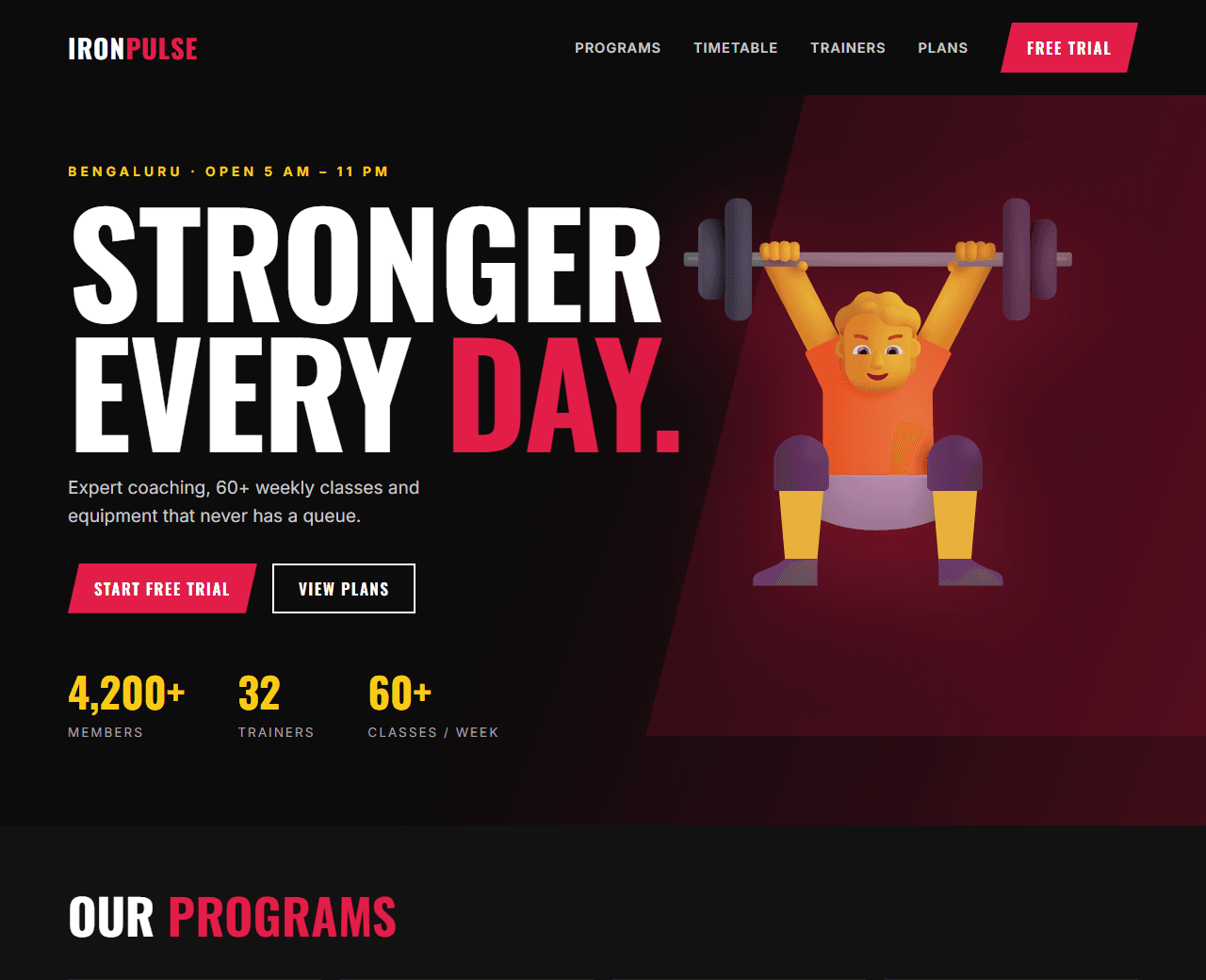
Example of the website this prompt builds. Your result will use your own name, text and images.
- Tech stack
- HTML, CSS and a little vanilla JavaScript
- Colour palette
#0c0c0c#ffffff#e11d48#facc15
- What it builds
- Navbar
- Bold hero
- Programs
- Class timetable
- Trainers
- Membership plans
- Transformation stories
- Free trial form
- Footer
The prompt
Copy everything in the box. Text in quotes and the sample business details are meant to be replaced with your own.
Build a one-page website for a gym called "Iron Pulse Fitness" in Bengaluru.

Tech stack: plain HTML, CSS and vanilla JavaScript in one file.

Visual style: bold and energetic. Black background (#0c0c0c), white text, strong red accent (#e11d48) and small yellow highlights (#facc15). Heavy condensed uppercase headings, large photos with dark overlays, angular shapes rather than soft rounded ones.

Sections, in order:
1. Navbar: logo, links, and a "Free trial" button.
2. Hero: a full-screen photo with a dark gradient overlay, a three-word uppercase headline, a supporting line and two buttons ("Start free trial", "View plans").
3. Programs: four cards (Strength, Cardio, Yoga, CrossFit) with a photo, title and one line; the card lifts and shows a red underline on hover.
4. Timetable: a weekly class schedule as a responsive table (days as columns, time slots as rows). On mobile it becomes a day selector with a list for the chosen day.
5. Trainers: four trainer cards with photo, name, speciality and years of experience.
6. Membership: three plans (Monthly, Quarterly, Annual) in rupees, with the annual plan marked "Best value".
7. Results: three member stories with a quote and what they achieved.
8. Free trial form: name, phone, preferred time and goal (select). Validate the phone number.
9. Footer: address, timings, phone, social links.

Interactions: the timetable day selector works without reloading; counters (members, trainers, classes per week) animate when scrolled into view.

Quality bar:
- Fully responsive: design mobile-first, then tablet (768px) and desktop (1200px).
- Accessible: semantic HTML landmarks, one h1, alt text on images, visible keyboard focus, colour contrast of at least 4.5:1 for body text.
- Fast: no heavy libraries, lazy-load images below the fold, system or two web fonts at most.
- Use placeholder images from a neutral source and realistic sample copy (no lorem ipsum).
- Respect prefers-reduced-motion for every animation.
- Keep the code clean and commented so I can edit it by hand.
How to use this prompt
- 1
Open an AI coding tool. Use any capable assistant: Claude, ChatGPT, Cursor, v0, Bolt, Gemini. Tools that can create files (Cursor, Claude Code, v0, Bolt) are the most convenient because they write the project for you.
- 2
Replace the sample details. Copy the prompt and change the business name, location, colours and any section you do not need. The more specific your details, the better the result.
- 3
Paste the prompt and generate. Send the whole prompt in one message. If the reply is cut off, say “continue from where you stopped”, or ask for one section at a time.
- 4
Run it on your computer. Save the result as index.html and open it in your browser. No installation is needed.
- 5
Review and refine. Check it on a phone-width screen, fix anything that looks off by describing it in plain words, then use the follow-up prompts below to add features one at a time.
- 6
Replace placeholders and publish. Swap in your real text and images, then deploy. Vercel and Netlify both host this kind of site for free.
Follow-up prompts
Send these one at a time after the first version is working. Small, specific requests give much better results than one giant prompt.
Add a BMI calculator widget with height and weight inputs.
Add a WhatsApp chat button fixed to the bottom-right corner.
Add LocalBusiness JSON-LD with opening hours and location.
Tips for a better result
- Use real member results only with written permission.
- List actual prices; 'call for pricing' loses most visitors.
- Want to hand-build a section instead? The Templates library has heroes, pricing tables, FAQs and more with full code.