Developer Portfolio
A professional personal portfolio for a software developer, with projects, skills, an experience timeline and a working contact form.
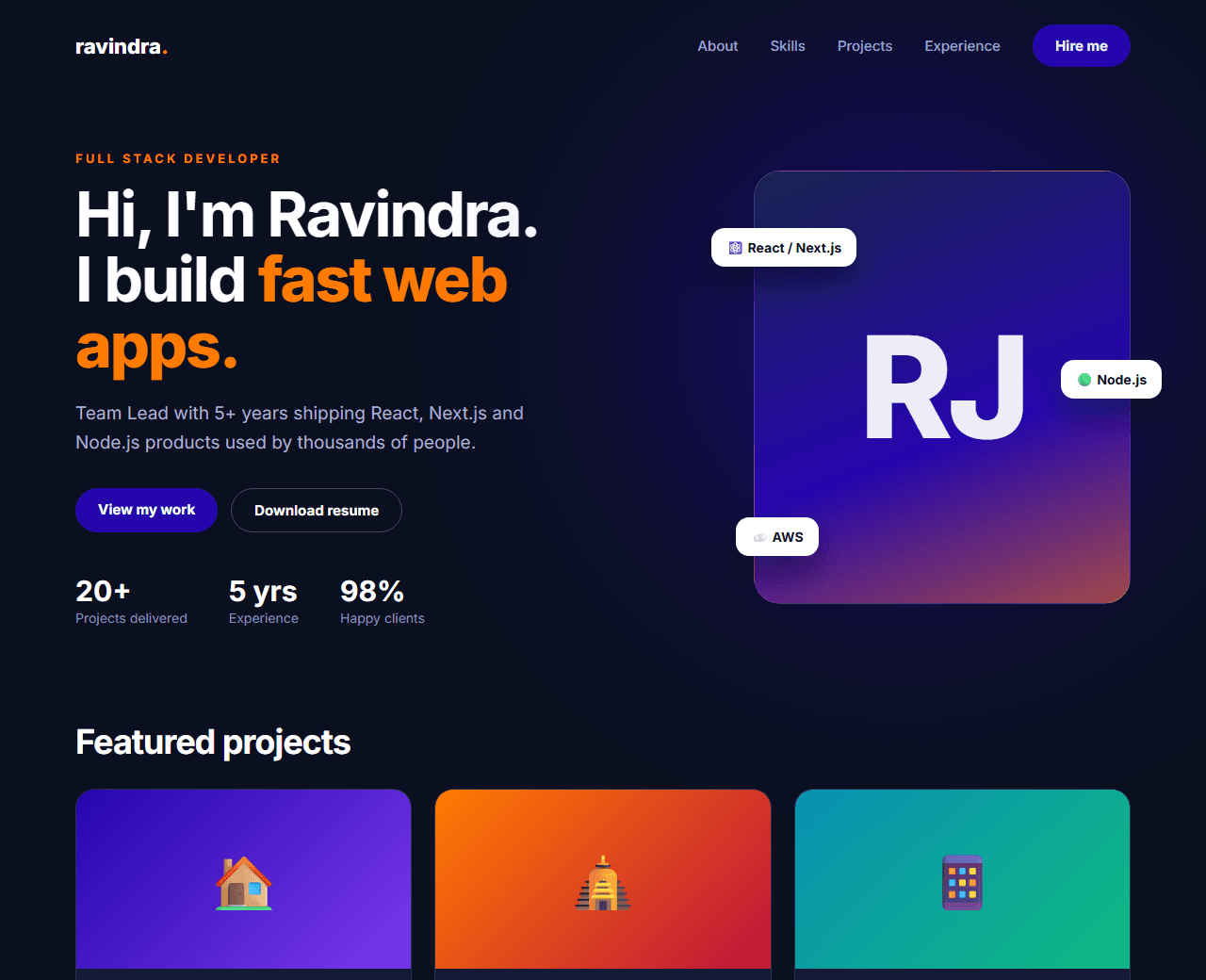
Example of the website this prompt builds. Your result will use your own name, text and images.
- Tech stack
- Next.js (App Router) + Tailwind CSS
- Colour palette
#0b1020#ffffff#2506ad#ff7b00
- What it builds
- Navbar
- Hero with photo
- About
- Skills by category
- Featured projects
- Experience timeline
- Testimonials
- Contact form
- Footer
The prompt
Copy everything in the box. Text in quotes and the sample business details are meant to be replaced with your own.
Build a personal portfolio website for a full stack developer.

About the person (replace with your own details): Ravindra Nath Jha, Team Lead and Full Stack Developer based in Faridabad, India, with 5+ years of experience in React, Next.js, Node.js, MongoDB, React Native and AWS.

Tech stack: Next.js (App Router) with Tailwind CSS. One page with anchor navigation, split into components.

Visual style: professional and restrained, dark theme. Background #0b1020, white headings, grey-blue body text, indigo (#2506ad) for buttons and orange (#ff7b00) for small accents only. Cards with a 1px translucent border and 16px radius. No cartoon illustrations and no rainbow gradients.

Sections, in order:
1. Navbar with the name as a text logo and links to each section, plus a "Hire me" button.
2. Hero: "Hi, I'm [Name]" with the role, a two-sentence summary, two buttons ("View my work", "Download resume"), social links, and a portrait photo placeholder in a rounded frame on the right. Stack on mobile with the photo first.
3. About: a short bio in two paragraphs and four quick facts (location, experience, availability, email).
4. Skills: four category cards (Frontend, Backend, Databases & Cloud, Mobile & Tools) each listing skills as small tags.
5. Featured projects: a 3-column grid of 6 project cards with screenshot placeholder, name, one-line description, tech tags and "Live demo" / "Source code" links.
6. Experience: a vertical timeline with three roles (company, title, dates, 2-3 achievement bullets). Mark the current role.
7. Testimonials: two quotes from colleagues or clients.
8. Contact: a form (name, email, message) with client-side validation and success/error states, next to direct email, phone and WhatsApp links.
9. Footer with quick links and copyright.

Interactions: smooth scrolling, active-section highlighting in the navbar, subtle fade-up on scroll.

Quality bar:
- Fully responsive: design mobile-first, then tablet (768px) and desktop (1200px).
- Accessible: semantic HTML landmarks, one h1, alt text on images, visible keyboard focus, colour contrast of at least 4.5:1 for body text.
- Fast: no heavy libraries, lazy-load images below the fold, system or two web fonts at most.
- Use placeholder images from a neutral source and realistic sample copy (no lorem ipsum).
- Respect prefers-reduced-motion for every animation.
- Keep the code clean and commented so I can edit it by hand.
How to use this prompt
- 1
Open an AI coding tool. Use any capable assistant: Claude, ChatGPT, Cursor, v0, Bolt, Gemini. Tools that can create files (Cursor, Claude Code, v0, Bolt) are the most convenient because they write the project for you.
- 2
Replace the sample details. Copy the prompt and change the business name, location, colours and any section you do not need. The more specific your details, the better the result.
- 3
Paste the prompt and generate. Send the whole prompt in one message. If the reply is cut off, say “continue from where you stopped”, or ask for one section at a time.
- 4
Run it on your computer. Create a project with “npx create-next-app@latest”, add the generated files, then run “npm run dev” and open http://localhost:3000.
- 5
Review and refine. Check it on a phone-width screen, fix anything that looks off by describing it in plain words, then use the follow-up prompts below to add features one at a time.
- 6
Replace placeholders and publish. Swap in your real text and images, then deploy. Vercel and Netlify both host this kind of site for free.
Follow-up prompts
Send these one at a time after the first version is working. Small, specific requests give much better results than one giant prompt.
Add a /projects/[slug] case-study page template with problem, approach, result and screenshots.
Make the contact form send email through a Next.js Route Handler using Nodemailer, with a honeypot field against spam.
Add Person JSON-LD structured data and Open Graph tags.
Add a blog section that reads MDX files from a content folder.
Tips for a better result
- Lead with outcomes in project descriptions ('cut load time by 40%') rather than a list of technologies.
- Three strong projects beat ten weak ones. Curate.
- Want to hand-build a section instead? The Templates library has heroes, pricing tables, FAQs and more with full code.