Coaching Institute & Online Course
A lead-generating website for a coaching institute or online course, with an enquiry form in the hero, course cards, faculty profiles and batch schedules.
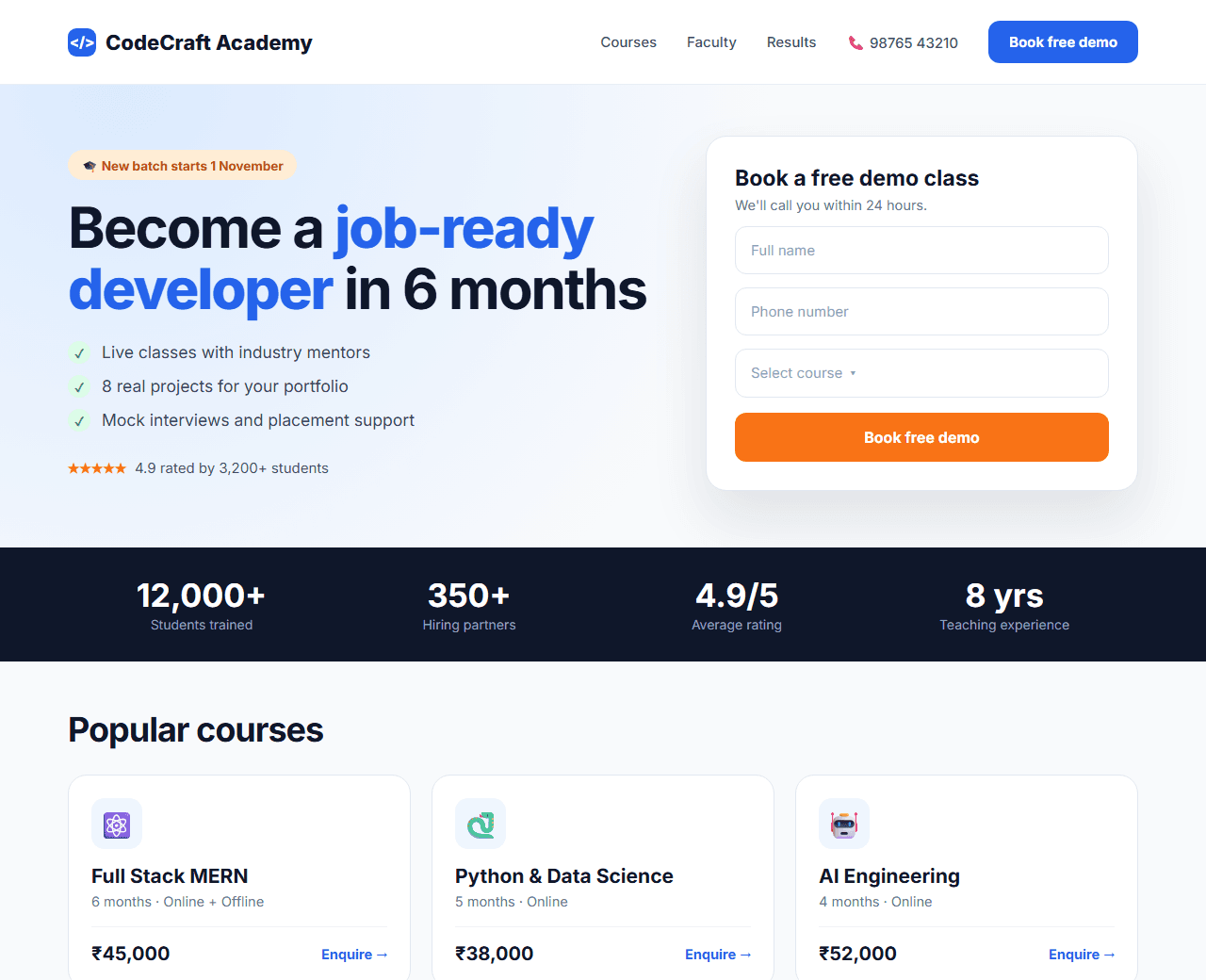
Example of the website this prompt builds. Your result will use your own name, text and images.
- Tech stack
- Next.js (App Router) + Tailwind CSS
- Colour palette
#f8fafc#0f172a#2563eb#f97316
- What it builds
- Navbar
- Hero with enquiry form
- Results and stats
- Courses grid
- Why choose us
- Faculty
- Student testimonials
- Batch schedule
- FAQ
- Footer
The prompt
Copy everything in the box. Text in quotes and the sample business details are meant to be replaced with your own.
Build a website home page for a coaching institute called "CodeCraft Academy" that teaches full stack web development to college students and working professionals in India.

Tech stack: Next.js (App Router) with Tailwind CSS.

Visual style: bright, friendly and credible. Light background (#f8fafc), dark slate text (#0f172a), blue (#2563eb) for primary actions and orange (#f97316) for highlights. Rounded 16px cards, clear headings, approachable illustrations made from simple shapes.

Sections, in order:
1. Navbar: logo, Courses, Faculty, Results, Contact, and a "Book a free demo class" button.
2. Hero, two columns: on the left a headline ("Become a job-ready developer in 6 months"), three bullet benefits with check icons and a rating line; on the right an enquiry form card (name, phone, course select, "Book free demo" button).
3. Stats bar: students trained, placement partners, average rating, years running.
4. Courses: six course cards (for example React, Node.js, Full Stack MERN, Python, Data Structures, AI Engineering), each showing duration, mode (online/offline), fee in rupees, next batch date and an "Enquire" button.
5. Why choose us: six benefit tiles (live classes, projects, doubt support, mock interviews, placement help, recordings).
6. Faculty: three instructor cards with photo, experience and companies worked at.
7. Testimonials: student quotes with the company they joined.
8. Upcoming batches: a table of course, start date, timing and seats left.
9. FAQ: fees, EMI options, refund policy, prerequisites, certificates.
10. Footer with address, phone, email and social links.

Interactions: the course select in the hero pre-fills when a course card's "Enquire" button is clicked and the page scrolls to the form.

Quality bar:
- Fully responsive: design mobile-first, then tablet (768px) and desktop (1200px).
- Accessible: semantic HTML landmarks, one h1, alt text on images, visible keyboard focus, colour contrast of at least 4.5:1 for body text.
- Fast: no heavy libraries, lazy-load images below the fold, system or two web fonts at most.
- Use placeholder images from a neutral source and realistic sample copy (no lorem ipsum).
- Respect prefers-reduced-motion for every animation.
- Keep the code clean and commented so I can edit it by hand.
How to use this prompt
- 1
Open an AI coding tool. Use any capable assistant: Claude, ChatGPT, Cursor, v0, Bolt, Gemini. Tools that can create files (Cursor, Claude Code, v0, Bolt) are the most convenient because they write the project for you.
- 2
Replace the sample details. Copy the prompt and change the business name, location, colours and any section you do not need. The more specific your details, the better the result.
- 3
Paste the prompt and generate. Send the whole prompt in one message. If the reply is cut off, say “continue from where you stopped”, or ask for one section at a time.
- 4
Run it on your computer. Create a project with “npx create-next-app@latest”, add the generated files, then run “npm run dev” and open http://localhost:3000.
- 5
Review and refine. Check it on a phone-width screen, fix anything that looks off by describing it in plain words, then use the follow-up prompts below to add features one at a time.
- 6
Replace placeholders and publish. Swap in your real text and images, then deploy. Vercel and Netlify both host this kind of site for free.
Follow-up prompts
Send these one at a time after the first version is working. Small, specific requests give much better results than one giant prompt.
Add a /courses/[slug] page with syllabus accordion, fee breakdown and an enrol button.
Send the enquiry form to a Route Handler that emails the institute and shows a thank-you message.
Add Course JSON-LD structured data for each course.
Add a free 'lecture notes' section that links to tutorial pages for SEO.
Tips for a better result
- Placement and salary claims must be verifiable. Show real numbers with the year, or leave them out.
- Put the phone number in the navbar; many students prefer to call.
- Want to hand-build a section instead? The Templates library has heroes, pricing tables, FAQs and more with full code.